
How AI Is Transforming the Future of Accounting & ERP
- Jun 8, 2025
- 2 min read
Updated: Jun 20, 2025

Smarter Accounting, Faster Forecasting, and More Informed Decisions for SMBs
Artificial Intelligence (AI) is no longer the future—it’s now embedded in the software we use every day. And with Microsoft Dynamics 365 Business Central, AI is playing a growing role in transforming how small and medium-sized businesses manage finance, inventory, forecasting, and decision-making.
In this blog, we explore how AI is being used within Business Central, what practical benefits it brings to SMBs, and how Smarter D365 helps you take full advantage of these evolving features.
Why AI in ERP Matters for Small Businesses
For many years, AI was something only large enterprises could access. But with the rise of cloud ERP systems and Microsoft’s ongoing investment in Copilot and machine learning, AI is now baked into the tools that SMBs use every day.
AI helps businesses:
Make faster, more accurate decisions
Automate repetitive tasks
Predict future outcomes (not just report the past)
Improve customer and supplier relationships
“We used to spend hours reviewing payment trends. Now our system suggests credit risk flags before we even notice them.” — Financial Controller, Distribution Business
AI Features Built Into Business Central
Microsoft has already released several intelligent features within Business Central—with more arriving rapidly through its Copilot initiative.
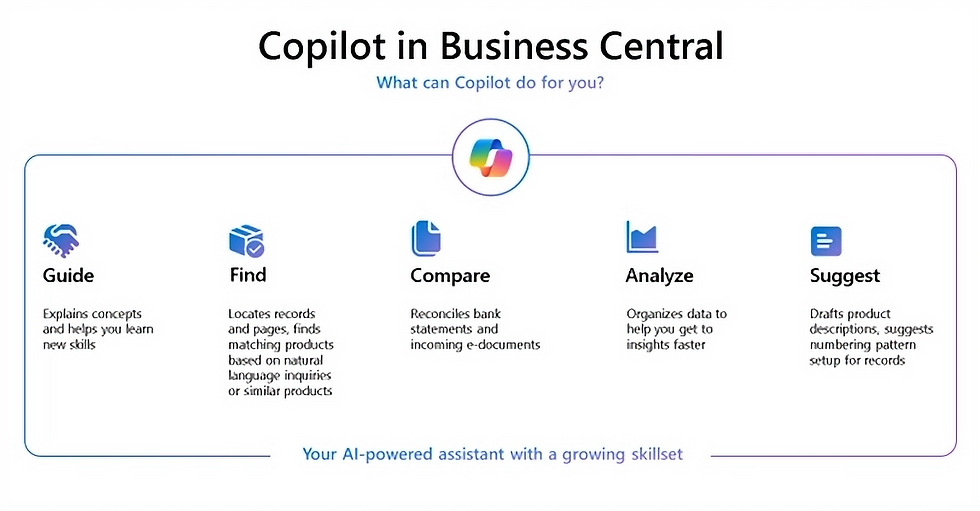
Here are some key AI-driven tools available today in Business Central:
1. AI-Powered Chat (Copilot)
| 2. AI Powered Insights Forecasting
|
3. Intelligent Document Processing
| 4. Inventory Forecasting & Demand Prediction, AI Generated Descriptions.
|
5. Cash Flow Forecasting
| 6. Late Payment Prediction
|
Real-World Benefits of AI in Business Central
Faster Forecasting: Generate real-time reports and financial projections without spreadsheets
Better Risk Management: Identify cash shortfalls or customer defaults early
Smarter Procurement: Order based on predicted demand, not guesswork
Improved Efficiency: Free your team from low-value manual work
“We used to rely on gut feel. Now we base inventory orders on AI forecasts—and we’ve reduced stockouts by 70%.” — Operations Manager, Retail SME

The Bigger Picture: AI and the Future of Finance
AI in ERP is just getting started. Microsoft continues to roll out new Copilot features, like:
Automatic summarisation of customer data
AI-generated responses in email or Teams
Smart insights for variance analysis and cost controls

This marks a shift from transactional ERP to intelligent ERP—where the system not only records what happened, but actively supports what should happen next.
Ready to Put AI to Work in Your Business?
You don’t need to be a tech giant to use AI. With Business Central and Smarter D365, it's already built in—ready to help your business think, plan, and grow smarter.
Email us at connect@smarterd365.co.uk
Click below to book your free discovery session